Easy Guide to WebAssembly & Emscripten
WebAssembly (Wasm) has emerged as a powerful tool for bringing high-performance, low-level code to the web. With its ability to run at near-native speed in web browsers, WebAssembly opens up exciting possibilities for web development. In this tutorial, we’ll explore how to leverage Emscripten, a popular toolchain for compiling C/C++ code to WebAssembly.
What is WebAssembly?
WebAssembly is a binary instruction format that serves as a compilation target for programming languages. It allows developers to run code written in languages like C, C++, and Rust on the web with near-native performance.
Key characteristics:
- Unlike JavaScript, WebAssembly is not human-readable
- Designed to be compact and efficient for transmission over the network
What is Emscripten?
Emscripten is an open-source toolchain for compiling C and C++ code into WebAssembly, along with accompanying JavaScript glue code to integrate with web applications.
It provides a bridge between these low-level languages and the web platform, enabling developers to:
- Port existing codebases to the web
- Write new high-performance code for web deployment
Getting Started:
1. Install Emscripten
The first step is to install Emscripten on your development machine. You can follow the installation instructions provided in the official Emscripten documentation (https://emscripten.org/docs/getting_started/index.html).
2. Write Your C/C++ Code
Once Emscripten is installed, you can start writing your C or C++ code. For demonstration purposes, let’s create a simple “Hello, World!” program in C.
#include <stdio.h>
int main() {
    printf("Hello, WebAssembly!\n");
    return 0;
}
3. Compile to WebAssembly
Use the Emscripten compiler (emcc) to compile your C/C++ code to WebAssembly. Navigate to the directory containing your source code and run the following command:
emcc hello.c -o hello.htmlThis command will generate three files:
hello.html,hello.js, andhello.wasm
4. Test Your Application with emrun
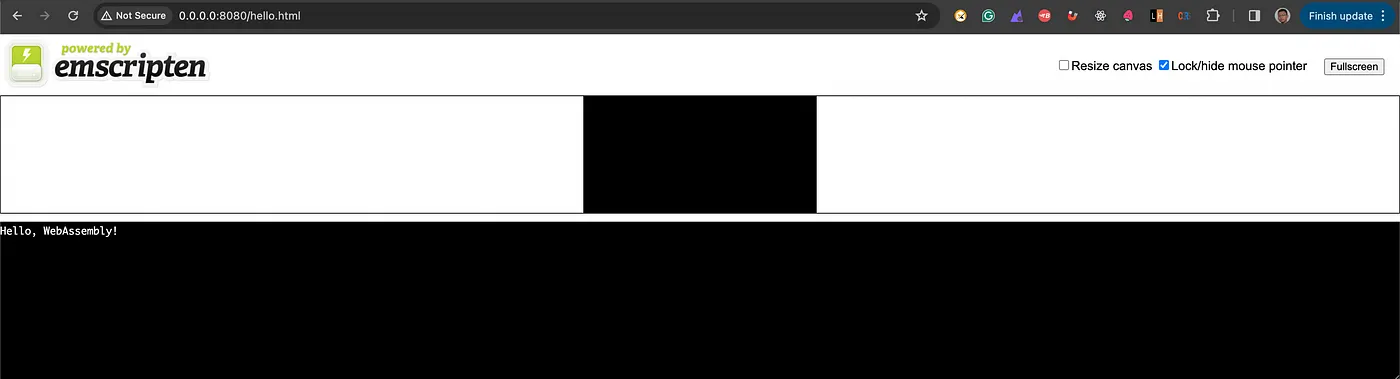
Instead of manually opening the HTML file in a browser, you can use emrun to simplify the testing process. First, navigate to the directory containing your hello.html file, then run:
emrun --no_browser --port 8080 .This command will start a local web server. You can then open your browser and go to http://localhost:8080/hello.html to see “Hello, WebAssembly!” printed!