Breaking Down Silos: The Day My Tickets Started Speaking Everyone's Language
The Challenge
At FrankieOne, we had a recurring problem: tickets lacked context for different stakeholders.
A single feature ticket needed to be understood by:
- QA Engineers: “What edge cases should I test?”
- Product Managers: “What’s the user impact and success metric?”
- Developers: “What are the technical risks and dependencies?”
- Security Team: “Are there any compliance implications?”
Without this context, we’d see:
- QA asking questions in comments (delays testing)
- PMs guessing at success metrics
- Devs discovering risks mid-implementation
- Meetings to “align on ticket details”
Result: 30-60 minutes per ticket spent on context-gathering instead of actual work.
The Solution
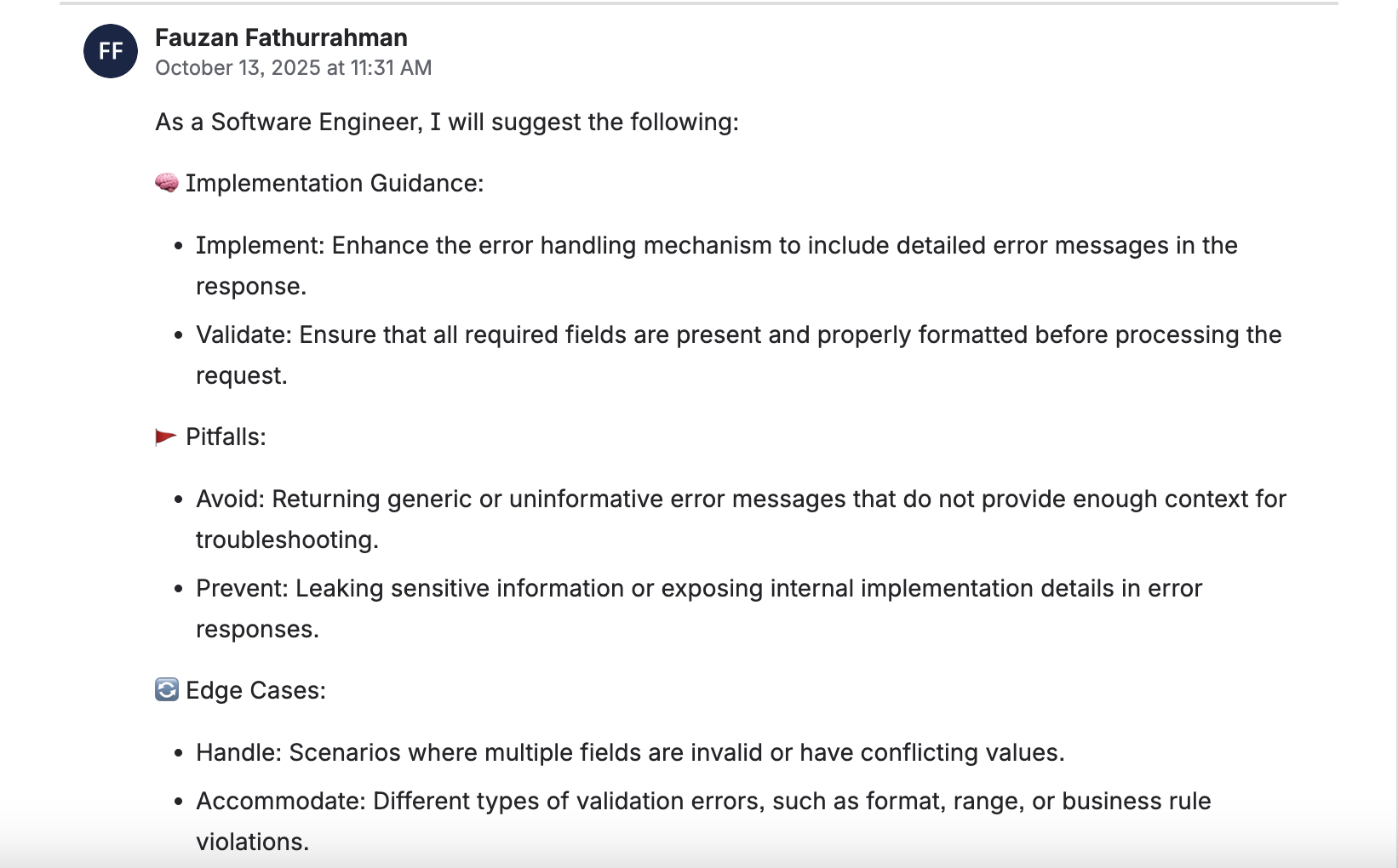
I built a Python-based GitHub Action that generates role-based insights for Jira tickets using AWS Bedrock AI. With a single button click, the system analyzes ticket content and generates tailored insights for different stakeholders—all automatically posted as comments.
The result: From 30-60 minutes of context-gathering to instant insights. ↓60% reduction in context gathering time.
How It Works
1. Fetch Ticket Data
When triggered, the automation:
- Extracts ticket details (summary, description, acceptance criteria)
- Retrieves ticket context and related issues
- Formats data for AI analysis
2. Generate Role-Based Insights
The ticket data is sent to AWS Bedrock AI, which generates insights for multiple roles:
- QA Perspective: Test scenarios, edge cases, validation points
- Product Manager Perspective: User impact, business value, success metrics
- Developer Perspective: Technical complexity, implementation risks, dependencies
- Custom Roles: Extensible for additional stakeholder perspectives
3. Post as Comments
Generated insights are automatically:
- Formatted as structured comments on the ticket
- Tagged with the role (e.g., “QA Insights”, “PM Insights”)
- Ready for team discussion and reference
The 3-Step Process
Jira Ticket
       ↓
[Trigger Automation Button]
       ↓
Fetch Ticket Data → Analyze Content → Send to Bedrock AI
       ↓
Generate Role-Based Insights (QA, PM, Dev, etc.)
       ↓
Post Comments → Tag by Role → Ready for Discussion
       ↓
Team Has Complete Context
Key Features
Multi-Perspective Analysis
- QA insights for testing and quality assurance
- PM insights for business and user impact
- Dev insights for technical implementation
- Extensible for custom roles
Seamless Jira Integration
- One-click automation from ticket view
- Insights appear as structured comments
- Full context preserved for team discussion
Consistent Quality
- AI-generated insights follow the same structure
- Standardized format across all tickets
- Easy to scan and reference
Technical Architecture
| Component | Details |
|---|---|
| Language | Python |
| Platform | GitHub Actions |
| Input | Jira ticket IDs |
| Processing | AWS Bedrock AI (Claude 3.5 Sonnet) |
| Output | Role-based insight comments |
| Integration | Jira REST API, GitHub Actions webhook |
Implementation Overview
The system generates insights in three stages:
Stage 1: Fetch & Analyze
def fetch_ticket_context(ticket_id):
    """Fetch ticket and related context"""
    ticket = jira_client.get_issue(ticket_id)
    linked_issues = jira_client.get_linked_issues(ticket_id)

    return {
        'ticket': ticket,
        'summary': ticket['fields']['summary'],
        'description': ticket['fields']['description'],
        'acceptance_criteria': extract_acceptance_criteria(ticket),
        'linked_stories': [i for i in linked_issues if i['type'] == 'Story'],
        'linked_bugs': [i for i in linked_issues if i['type'] == 'Bug'],
        'epic': ticket['fields'].get('customfield_epic'),
        'priority': ticket['fields']['priority']['name']
    }

def prepare_for_analysis(context):
    """Format context for AI analysis"""
    return f"""
    Ticket: {context['summary']}
    Priority: {context['priority']}
    Description: {context['description']}
    Acceptance Criteria: {context['acceptance_criteria']}
    Related Stories: {len(context['linked_stories'])}
    Related Bugs: {len(context['linked_bugs'])}
    Epic: {context['epic']}

    Generate insights for each role...
    """
Stage 2: Generate Role-Based Insights
def generate_insights(ticket_context):
    """Generate insights for multiple roles"""
    roles = ['QA', 'Product Manager', 'Developer', 'Security']
    insights = {}

    for role in roles:
        prompt = f"""
        Analyze this ticket from a {role} perspective:
        {ticket_context}

        Provide 3-5 key insights specific to {role}:
        - Focus on what matters for this role
        - Be concise and actionable
        - Highlight risks and opportunities
        """

        response = bedrock_client.invoke_model(
            modelId='anthropic.claude-3-5-sonnet-20241022-v2:0',
            body=json.dumps({
                'anthropic_version': 'bedrock-2023-06-01',
                'max_tokens': 500,
                'messages': [{'role': 'user', 'content': prompt}]
            })
        )
        insights[role] = response['content'][0]['text']

    return insights

def format_insights_for_jira(insights):
    """Format insights as structured comments"""
    comments = []
    for role, insight_text in insights.items():
        comment = f"""
        **{role} Insights**

        {insight_text}

        ---
        _Generated by AI Insights automation_
        """
        comments.append(comment)
    return comments
Stage 3: Post Comments
def post_insights(ticket_id, insights):
    """Post insights as comments on ticket"""
    for comment in insights:
        jira_client.add_comment(ticket_id, comment)
        # Add label for tracking
        jira_client.add_label(ticket_id, 'ai-insights-generated')
Real-World Impact
- Better Context: Team members get role-specific insights without asking questions
- Faster Decision Making: All perspectives available immediately on the ticket
- Reduced Meetings: Less back-and-forth needed to understand ticket implications
- Consistency: Every ticket gets the same quality of analysis
Benefits for Teams
- QA Teams: Immediate test scenarios and edge cases to consider
- Product Managers: Clear business impact and success metrics
- Developers: Technical risks and implementation considerations identified upfront
- Stakeholders: Complete context without reading lengthy descriptions
Use Cases
- Feature Planning: Generate insights before development starts
- Bug Triage: Understand impact and priority from multiple angles
- Technical Debt: Assess business and technical implications
- Dependency Analysis: Identify cross-team impacts automatically
Lessons Learned
1. Context is Everything
The quality of insights depends on how much context you provide:
- Minimal context (just summary): Generic insights
- Full context (description + acceptance criteria + linked issues): Highly relevant insights
- Rich context (above + epic + priority + history): Exceptional insights
We now fetch as much context as possible before generating insights.
2. Role-Specific Prompts Work Better
Generic prompts produce generic insights. We found that role-specific prompts are much better:
- Generic: “Analyze this ticket”
- Role-specific: “As a QA engineer, what edge cases and test scenarios should we consider?”
The second approach produces 3x more actionable insights.
3. Hallucinations Are Real
AI sometimes generates insights that don’t match the ticket:
- Mentioning features that don’t exist
- Suggesting tests for wrong functionality
- Misunderstanding requirements
Solution: Always include a review step. We have team leads review AI-generated insights before they’re posted (takes 30 seconds, prevents embarrassment).
4. Different Roles Need Different Depths
- QA insights: Need to be very detailed (test scenarios, edge cases)
- PM insights: Need to be high-level (user impact, success metrics)
- Dev insights: Need to be technical (complexity, dependencies, risks)
We tuned prompts and token limits per role.
Metrics After 3 Months
| Metric | Before | After | Change |
|---|---|---|---|
| Time to understand ticket (avg) | 30-60 min | 5-10 min | ↓75% |
| Questions asked in comments | 8-12 per ticket | 1-2 per ticket | ↓85% |
| Meetings to “align on ticket” | 2-3 per sprint | 0-1 per sprint | ↓80% |
| Tickets with missing context | 40% | 5% | ↓88% |
| Team satisfaction with clarity | 60% | 92% | ↑53% |
| Time to start implementation | 2-4 hours | 30 min | ↓90% |
The most important metric: Teams started work faster because they had all the context they needed upfront.
Real Example
Before AI Insights:
Ticket: Add two-factor authentication to login flow

Developer: "What's the scope? SMS only or also email?"
PM: "Both, but SMS is priority"
QA: "What about users without phone numbers?"
Dev: "Good point. What should we do?"
PM: "Show an error and suggest email"
Security: "Wait, did we consider rate limiting?"
Dev: "No, let me add that"

Result: 45 minutes of back-and-forth, implementation delayed
After AI Insights:
Ticket: Add two-factor authentication to login flow
[AI generates insights immediately]

QA Insights:
- Test SMS delivery (success, failure, timeout)
- Test email delivery (similar scenarios)
- Test users without phone/email (error handling)
- Test rate limiting (5 attempts per hour)

Dev Insights:
- Consider: SMS provider reliability, email delivery latency
- Risk: Rate limiting could lock out legitimate users
- Dependency: Need to update user model for phone number

PM Insights:
- Success metric: 80% of users enable 2FA within 30 days
- User impact: Adds 30 seconds to login flow
- Rollout: Gradual rollout starting with power users

Security Insights:
- Implement rate limiting (5 attempts per hour)
- Consider: Session fixation attacks
- Compliance: Ensure audit logging for all attempts

Result: All context available immediately, dev starts work in 10 minutes
The Takeaway
AI-powered insights democratize context. By generating role-based perspectives automatically, teams can make better decisions faster and reduce the cognitive load of context-switching.
The future of collaboration isn’t about writing more comments—it’s about generating smarter insights automatically and letting teams focus on what matters: building great products.
If your team spends more time asking questions than building, this is worth implementing. The ROI is immediate: faster decisions, better alignment, and happier engineers.